Integrating Decorative Owl Vector Art into Professional Design Workflows
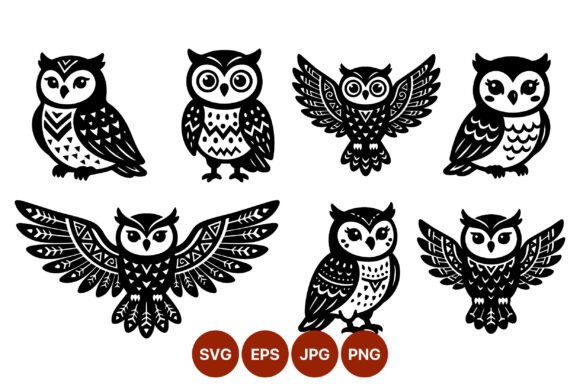
In the fast-paced environment of digital content creation, the ability to source and implement high-quality assets efficiently is a critical skill. Whether you are a freelance graphic designer, a small business owner managing your own branding, or an educator creating engaging materials, the visual elements you choose define the perceived quality of your work. Decorative Owl Vector Art represents more than just a stylistic choice; it is a versatile asset class that bridges the gap between whimsical illustration and professional design execution. This collection of seven black and white vector illustrations offers a specific utility: high-contrast, scalable imagery that maintains integrity across various media formats.
Understanding how to integrate these assets into your broader creative process requires looking beyond the aesthetic appeal. It involves recognizing where these files fit within your project timeline, how they interact with your existing toolset, and how they can streamline your production workflow. By focusing on the technical specifications and practical applications of this collection, you can maximize the return on your investment and ensure consistent, sharp results in every deliverable.
The Strategic Value of High-Contrast Vector Assets
When evaluating design resources, scalability and clarity are paramount. Raster images, such as standard JPEGs or PNGs, often suffer from pixelation when resized, leading to additional time spent sourcing higher-resolution versions or recreating assets from scratch. The Decorative Owl Vector Art collection addresses this bottleneck by providing files in SVG and EPS formats. These vector-based formats use mathematical paths rather than pixels, ensuring that the intricate decorative feather patterns remain crisp whether printed on a business card or displayed on a large-format banner.
The high-contrast nature of these black and white illustrations serves a functional purpose beyond style. High contrast ensures legibility and visual impact, which is essential for branding materials where immediate recognition is key. In a workflow context, this means less time adjusting opacity levels, adding drop shadows, or tweaking color balances to make an image pop against a busy background. The stark delineation between the black ink and white space allows for seamless integration into minimalist designs, monochrome printing projects, or as a base layer for more complex colorization tasks.
Pre-Production Planning and Asset Selection
Effective design begins with preparation. Before opening your design software, consider the specific role these owl illustrations will play in your project. Are they serving as primary focal points, secondary decorative elements, or background textures? The collection includes both sitting and flying poses, offering dynamic options for layout composition. A sitting pose might anchor a footer or serve as a stable icon for a "About Us" section, while a flying pose can guide the viewer’s eye across a page or indicate movement and progress in an infographic.
During the planning phase, assess the compatibility of these assets with your brand guidelines. Since the files are provided in black and white, they offer maximum flexibility. You can maintain the original monochrome look for a classic, sophisticated feel, or easily recolor them to match specific brand palettes using vector editing tools. This adaptability reduces the need to purchase multiple variations of the same asset, streamlining your budget and file management processes.
Implementation Across Different Media Formats
The download includes a ZIP folder containing SVG, PNG, JPG, and EPS files. Understanding when to use each format is crucial for maintaining efficiency and quality control throughout your workflow.
- SVG (Scalable Vector Graphics): Ideal for web design and digital interfaces. SVGs are code-based, meaning they load quickly and remain sharp on retina displays. Use these for website icons, interactive elements, or responsive design components where file size and scalability are priorities.
- EPS (Encapsulated PostScript): The industry standard for professional printing. If you are sending files to a commercial printer for brochures, packaging, or signage, EPS ensures that the vector data is preserved and interpreted correctly by professional RIP software. This format is essential for maintaining the sharpness of the decorative feather patterns at any size.
- PNG (Portable Network Graphics): Best for digital documents, presentations, and social media graphics where transparency is needed. The PNGs included in this collection likely have transparent backgrounds, allowing you to layer the owls over colored backgrounds or photographs without cumbersome masking tasks.
- JPG (Joint Photographic Experts Group): Suitable for quick previews, email attachments, or platforms that do not support transparency. While not editable, JPGs are universally compatible and useful for rapid prototyping or sharing concepts with clients who may not have vector editing software.
By selecting the appropriate format for each stage of your project, you avoid common pitfalls such as blurry prints or oversized web files. This strategic selection process enhances overall productivity and ensures that the final output meets professional standards.
Enhancing Branding and Educational Materials
For entrepreneurs and marketers, consistency is key to building brand recognition. The stylized nature of these owls, with their decorative feather patterns, adds a unique character that can differentiate your brand from competitors using generic stock imagery. You can incorporate these vectors into your logo suite, business cards, letterheads, and packaging. The ability to scale them without loss of quality means you can use the same asset across all touchpoints, reinforcing brand identity through visual consistency.
Educators and publishers will find these illustrations particularly useful for creating engaging learning materials. The clear lines and distinct shapes make them ideal for coloring books, worksheets, and classroom decorations. The black and white format invites interaction, allowing students to color the owls themselves, which can be a valuable activity for developing fine motor skills and creativity. Furthermore, the vector format allows educators to resize the images to fit specific worksheet layouts without worrying about resolution issues, saving time during lesson planning.
Workflow Integration and Customization Tips
To fully leverage the potential of Decorative Owl Vector Art, consider integrating it into your standard design templates. Create a library of pre-styled versions of these owls in your brand colors, saving them as reusable symbols or components in your design software. This approach reduces repetitive tasks and ensures that every new project starts with a consistent visual language.
When customizing these vectors, pay attention to the balance between the decorative patterns and the negative space. Over-editing can clutter the design and diminish the impact of the high-contrast aesthetic. Use the vector nodes to subtly adjust proportions if necessary, but respect the original artistic intent. The stylized feathers are designed to create texture and depth without relying on grayscale gradients, so maintain this integrity for the best visual results.
Additionally, consider combining these owl illustrations with other design elements such as typography, geometric shapes, or botanical motifs. The neutral black and white palette makes them excellent companions for a wide range of design styles, from modern minimalist to vintage eclectic. Experiment with layering and opacity to create depth and interest in your compositions.
Long-Term Utility and File Organization
Investing in high-quality vector assets is a long-term strategy. Unlike trend-dependent raster images, well-designed vectors have enduring value. To maximize this value, organize your downloaded files systematically. Store the ZIP archive in a central asset library, and extract the files into clearly labeled folders based on format (SVG, EPS, PNG, JPG). Include metadata or notes about usage rights and source information to facilitate easy retrieval in future projects.
Regularly review your asset library to identify opportunities for reuse. A vector used in a past marketing campaign might be repurposed for a new product launch or internal presentation. By maintaining an organized and accessible library of resources like the Decorative Owl Vector Art collection, you build a foundation of efficiency that supports sustained creativity and productivity.
In conclusion, the integration of Decorative Owl Vector Art into your design workflow offers tangible benefits in terms of quality, flexibility, and efficiency. By understanding the technical advantages of vector formats, planning their application strategically, and maintaining organized asset management practices, you can elevate the professionalism of your output. Whether for branding, education, or personal projects, these illustrations provide a reliable and versatile tool for achieving sharp, impactful visual communication.