Decorative Anchor Design Bundle: A Practical Guide to Nautical Vector Art
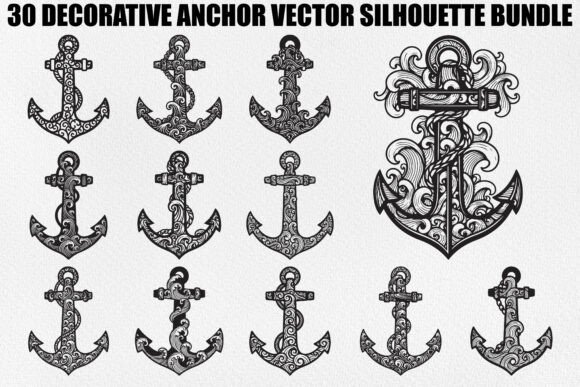
When sourcing digital assets for creative projects, the difference between a professional finish and a amateurish result often lies in the quality of the source files. The Decorative Anchor Design Bundle represents a curated collection of thirty artistic designs that merge nautical symbolism with ornamental elegance. These are not merely simple clipart images; they are intricate silhouettes featuring swirls, curls, and decorative motifs that require precise handling to maintain their integrity during production. For designers, crafters, and small business owners, understanding how to properly utilize these vector graphics is essential for achieving clean cuts, sharp prints, and scalable results.
Understanding the Value of Vector Versus Raster
A common misconception among beginners is treating all digital image files as interchangeable. This bundle includes SVG, EPS, AI, PNG, JPG, and PDF formats, but using the wrong format for your specific tool can lead to significant quality loss. Many users mistakenly rely on PNG or JPG files for cutting machines like Cricut or Silhouette Cameo. While these raster formats are suitable for web display or simple printing, they lack the mathematical paths required for precision cutting. When you use a raster image for a laser cutter or vinyl plotter, the machine may struggle to interpret edges, resulting in jagged lines or incomplete cuts.
To avoid this, always prioritize the SVG, EPS, or AI files when working with cutting software. These vector formats ensure that your anchor designs remain crisp and smooth regardless of size. Whether you are creating a small sticker for a mug or a large wall decal, vector graphics scale infinitely without pixelation. This scalability is crucial for maintaining the delicate details of the swirls and curls inherent in this decorative anchor collection.
Overlooking File Compatibility and Software Requirements
Another frequent oversight involves software compatibility. Not all design programs handle every vector format equally. For instance, while Adobe Illustrator opens AI and EPS files natively, free alternatives like Inkscape may require specific import settings for EPS files to render correctly. Users who attempt to open complex vector files in basic photo editors often find that the layers are flattened or the editable paths are lost. This prevents any further customization, such as adjusting the thickness of the anchor’s shank or modifying the ornamental flourishes.
Before downloading or purchasing, verify which software you will be using. If you are a Cricut user, the included SVG files are optimized for Design Space, ensuring that the cut lines are recognized immediately. For Silhouette Cameo users, SVGs also work well, though some may prefer converting EPS files within Silhouette Studio for additional control. By matching the file format to your software’s strengths, you save time on troubleshooting and ensure a smoother workflow from design to final product.
Neglecting Detail Density in Cutting Projects
The Decorative Anchor Design Bundle features intricate details, including fine curls and ornamental motifs. While these elements add visual charm, they present a challenge for certain materials and machines. A common mistake is attempting to cut these highly detailed designs on thick or textured materials without adjusting blade depth or speed. This can lead to tearing, especially with vinyl or paper, where the small negative spaces between the swirls may not weed cleanly.
To mitigate this, consider the end application carefully. For vinyl decals, ensure that the smallest details are larger than the minimum cut size recommended by your machine manufacturer. If a particular anchor design has extremely fine lines, it may be better suited for printing rather than cutting. Alternatively, you can simplify the design by removing the smallest decorative elements if your material cannot support them. Testing a single design on a scrap piece of your chosen material before committing to a full batch is a prudent step that prevents wasted resources and frustration.
Misinterpreting Symbolism and Audience Appeal
Beyond technical execution, there is a strategic element to using nautical imagery. Anchors traditionally symbolize stability, hope, and grounding. However, the addition of decorative swirls and boho-style motifs shifts the aesthetic from maritime ruggedness to elegant sophistication. A mistake many marketers make is assuming these designs only appeal to coastal demographics. In reality, the blend of strength and creativity makes these silhouettes versatile for wedding invitations, baby shower decorations, and even corporate branding for businesses emphasizing reliability.
When incorporating these anchors into your projects, align the decorative style with your target audience. A minimalist anchor might suit a modern tech logo, but the ornate versions in this bundle are ideal for handmade gifts, scrapbooking, and boutique apparel. Understanding this nuance allows you to position your products more effectively. For example, using these designs on t-shirts or mugs can evoke a sense of personalized care and artistic flair, which resonates strongly with consumers looking for unique, non-mass-produced items.
Ensuring High-Resolution Output for Print
For those focusing on printed goods rather than cut vinyl, the included PNG and JPG files are valuable assets. However, a critical error is using low-resolution previews instead of the high-resolution files provided. Printing a small, low-quality image on a large poster or t-shirt results in blurry, unprofessional outcomes. Always check the DPI (dots per inch) of your files. The bundle provides high-resolution JPGs and transparent PNGs specifically designed to maintain clarity at various sizes.
When preparing files for print-on-demand services or home printers, ensure that the transparent background of the PNG files is preserved. This allows the anchor design to sit seamlessly on colored fabrics or papers without an unsightly white box around it. Additionally, verify color profiles if you are working with professional printing houses, as screen colors (RGB) often differ from printed colors (CMYK). Adjusting your design settings beforehand ensures that the deep blacks and intricate details of the anchor silhouettes appear as intended.
Maximizing Versatility Across Platforms
The true power of this bundle lies in its versatility. It is not limited to a single craft or medium. By leveraging the different file formats, you can create a cohesive brand identity across multiple touchpoints. Use the SVGs for website icons and laser-cut wooden signs, the PNGs for social media graphics and digital invitations, and the PDFs for printable worksheets or coloring pages. This multi-format approach ensures consistency in your visual messaging while adapting to the technical requirements of each platform.
Remember to organize your files logically. With thirty distinct designs, keeping track of which anchor corresponds to which project can become chaotic. Create a folder structure that separates files by format and perhaps by complexity. This organizational habit saves time during urgent projects and helps you quickly locate the perfect design for specific client requests or personal creations.
In conclusion, the Decorative Anchor Design Bundle offers a robust resource for creators willing to pay attention to detail. By choosing the correct file formats, respecting the limitations of your cutting materials, and understanding the aesthetic appeal of ornate nautical symbols, you can elevate your DIY projects and professional offerings. Avoid the common pitfalls of incompatible software usage and low-resolution printing, and you will find these vector assets to be indispensable tools in your creative arsenal.